expr:class='"loading" + data:blog.mobileClass'>

Pages

Friday, August 19, 2011

DELL INSPIRON N4010 In Review


dell
It’s been 3 weeks when I got my first Laptop of my own, not from a contest (tried some) but it’s not ment for me. Anyway,I strongly recommend that you have a little bit knowledge or information of the product you are buying especially on gadgets. This BLOG is very helpful which I read the night before buying my Dell Inspiron.


IMG03689-20110819-1406


  The reason behind buying this one is for educational purposes which I use in Sketch up, Photoshop and Auto Cad Open-mouthed smile. My Mini Dell will be my best companion through my endless journey.Nerd smile.


system
Click to enlarge

specs
The 5.1-pound laptop is basically equipped with Intel Core i3 processor, 2gb RAM Memory, 64 Bit Operating System,320 GB Hard Drive, 14’ LCD Display, DVD-RW, 1 GB Graphics (can be upgrade up to 6GB) and ATI Radeon HD 5470 . and a FREE DOS (HOME Basic). The Inspiron 14R is no slouch. Core i3 processor offer more than enough performance for everyday Web surfing, e-mail, word processing, and light image editing. With 2GB of RAM, the system is pretty responsive.


The Unit comes with…
IMG03681-20110819-1356 IMG03696-20110819-1419
IMG03698-20110819-1421   IMG03682-20110819-1400
Before purchasing the Dell Inspiron, I tried searching different stores that offers the laptop I'm looking for which led me to SM Cyberzone Accent Micro Store (Note: they have an ongoing PROMO so hurry up and buy!Laughing out loud). Basically, what I only  need is a higher graphics, a 1GB Video Card will do. I just noticed that most of Dell Laptops are bulky and heavy.

IMG03684-20110819-1402
  1. >Cyrstal  HD screens.
>Rich graphics.
>SRS Premium Sound.


For movie fanatics like me, this will surely the best for you.


Aside from the crisp SRS Premium Sound, Dell’s Dock like Apple Mac is what I like from the DELL Inspiron. It ‘s so COOL!!

IMG03687-20110819-1405

*HDMI output
*eSATA/USB port
*Multiformat card reader


DELL INSPIRON SPEC's
Model
Dell Inspiron 14R (Model N4010) Laptop Specification

Processor
Core i3-350M Intel processor (2.26GHz, two cores, and four threads)

LCD Display
14 inch LCD Display

RAM / Memory
4GB DDR3 can be upgraded up to 6GB

Graphic Controller
ATI Radeon HD 5470 with 1GB graphics RAM

Communications
802.11n Wireless LAN, Ethernet LAN

HDD / Storage
320 GB hard drive

Optical Drive
8X CD/DVD burner

Other Features
HDMI output, eSATA/USB port, multiformat card reader, and the SRS Premium Sound speakers

1.0MP Integrated 1280x720 native HD Webcam
Likes:
  • Discrete graphics and premium sound
  • Good keyboard and touchpad
  • Dell Dock
Dislikes:
  • Poor battery life (about 3 hours)
  • Thumb magnet
  • Bulky
This is my first Tech Review so I'm expecting trolls and bad comments but I do accept it. Smile with tongue out 
Check this sites out for more info about gadgets etc..!
Calvin's Hub YugaTech Technoodling Gadget Magazine Tech Pinas  Abuggedlife  PinoyTech Blog and Glich's Life .

Thursday, August 18, 2011

The Best Laptop Computers

The Best Laptop Computers - Yahoo! Shopping


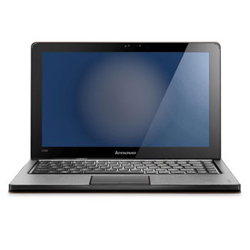
Lenovo IdeaPad U260
Photo: Lara Robby/Studio D
We looked at laptops for every type of user: the student who needs a superlight classroom companion, the multimedia multitasker who wants a powerful desktopreplacement, and plenty in between. The following five aced our tests.

Lenovo IdeaPad U260

Starting at $700 ($999 model tested)
Pros: This tiny, 3-pound 12.5-incher was the darling of consumer testers, thanks to the simplekeyboard, trackpad, and navigation (plus its sleek cover, in orange or brown). It booted up and transferred files in seconds, and has a superb battery — we got 6.5-plus hours on a charge.


Cons: With less-than-stellar audio and video quality and a petite screen, it's not ideal for watching movies or listening to music.
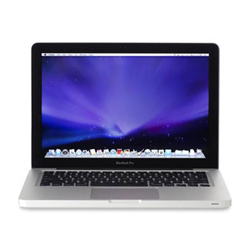
Apple MacBook Pro 13
Photo: Lara Robby/Studio D
More from GoodHousekeeping.com:

Apple MacBook Pro 13"

Starting at $1,134
($1,199 model tested)

Pros: The MacBook Pro (or, for $100 more, the super-slim Air 13") was a winner even with begrudging PC fans. Highlights: its multi-touch trackpad, speedy processing, admirable screen and sound, impressive battery life (6.5 hours), and its weight — just 4.5 pounds.
Cons: Fewer ports than most. With just two USB slots, you may not be able to connect, say, your external drive, camera, and mouse at once.
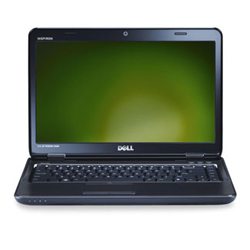
Dell Inspiron 14R N4110
Photo: Lara Robby/Studio D

Dell Inspiron 14R N4110

Starting at $500 ($550 model tested)
Pros: This well-priced Dell impressed our engineers with speedy boot-up and file-transfer times. Its high-quality video and graphics and great-sounding audio are perfect for watching a movie on a plane. Consumers liked its keyboard, 14-inch screen, and fluid navigation.
Cons: Customizable covers, though cool-looking in 11 styles, make it seem thick. Its battery lasted only about 3 hours.


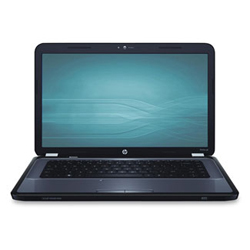
HP Pavilion G6
Photo: Lara Robby/Studio D

HP Pavilion G6

Starting at $430 ($550 model tested)
Pros: The affordable 15.5-inch HP zipped through our file-transfer tests. Its screen display is clear, even at a broad angle — great if family gathers 'round to view photos. Testers enjoyed typing on its keyboard and using its trackpad, which is textured for a more "in control" feel.
Cons: It may be a little too large for frequent traveling. The battery was only OK, lasting a smidgen over 4 hours on our tests.


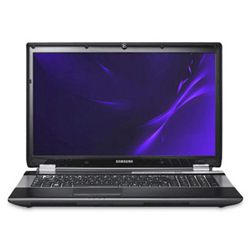
Samsung RF711
Photo: Lara Robby/Studio D

Samsung RF711

Starting at $920 ($1,100 model tested)
Pros: This 17.3-inch, 6.4-pound behemoth isn't one for a road trip, but it's sure to wow at home. Testers were pleased with the screen quality, the keyboard's spaciousness, and the computer's overall intuitive navigation. Files transferred in a blink, and graphics are stunning for showing movies and video games alike.
Cons: A laptop in name only, as few would want this 6.4-pounder in their laps or weighing down a bag. Short battery life: just over 3 hours.


Credits to: Yahoo

Monday, August 15, 2011

Netbook Or Notebook?


Which is Right for You: Netbook or Notebook?


    Netbooks are ultra-light, ultra-affordable, and easy to carry. Notebooks are full-sized, full-performance—and full-priced. Here's what you’ll need to know to make the savviest and most cost-effective choice.

    Light vs. Ultralight

    Both styles of PC are designed for easy travel, yet there's a notable difference between the lighter-than-air netbooksand the more substantial notebooks.

    Netbooks

    Netbooks are all about computing on the move. Weighing less than three pounds, with screens that are 12 inches or smaller, a netbook can be tossed easily into a backpack or purse, or even carried comfortably in one hand. If you lug your machine around all day long, that's a major consideration.
    Netbooks are leaner, and better suited to web-based usage, as they rarely have a CD or DVD drive. Their processors make them both energy-efficient and power-conscious, but that also means they're designed to run fewer programs simultaneously.
    If you have a web-driven lifestyle, such as blogging for work or pleasure, netbooks are a sleek way to go. Less hardware means less power drain, so netbooks have a longer battery life, lasting up to twelve hours without a charge. If an ultra-light machine can handle your needs, it's definitely the better choice.

    Notebooks

    Notebooks are more substantial, with larger keyboards and screens, built-in DVD drives, and more computing strength. With a weight starting at about five pounds, notebooks are built with the heft to edit massive video files, create graphics, or manage large music libraries. Keep in mind that more tech muscle requires more human muscle (to carry) and electric muscle (to power).
    The larger hard drive of a notebook delivers power and speed, capable of storing huge amounts of content while easily running multiple data-heavy programs. If your priority is strength over convenience, then notebooks are the best.

    LCD vs. Battery Life

    There’s a clear trade-off between the size of the LCD screen and the length of battery life. If a large screen is your main priority, notebooks are for you. Just remember that increased screen size has a corresponding battery drain, too.

    Power vs. Convenience: The Choice Is Yours

    Are you creating content or consuming it? If you need a machine that offers "heavy lifting" in terms of performance, you need a notebook. If your lifestyle allows you to travel lightly, then netbooks are the best choice for you.

    Source: SAMSUNG

    Remembering The Great Ninoy and Cory


    IMG03531-20110815-1131IMG03530-20110815-1130
    Flirt maleToday (August 15, 2011) our school organization (UAPSA) held a field observation on “MUSEUM DESIGN” at The AQUINO MEMORIAL HALL, San Miguel Tarlac. The place is good, nice ambiance, quiet and peaceful. I find it more interesting to know the the lives of Benigno Simeon Aquino, Jr and Maria Corazon Sumulong Cojuangco-Aquino and how they struggle for freedom.

     IMG03519-20110815-1042  IMG03595-20110815-1201
    IMG03516-20110815-1041IMG03562-20110815-1148
    Upon entering The Museum ….
    Here are some  Artifacts you can see outside the Gallery.Nerd smile
    IMG03539-20110815-1136         IMG03537-20110815-1135
    IMG03538-20110815-1136
    IMG03523-20110815-1128
    IMG03534-20110815-1132
    We are not allowed to take photos inside the Gallery Hall but the photos and artifacts I saw will be in my mind forever.
    What would you see inside the Gallery is all about  Ninoy and Cory’s documents during and after the Marcos Regime, EDSA People Power Revolution Photos, Political News, Room of Ninoy while he is in jail, Cory’s Paints, Diaries of Mr. and Mrs. Aquino and many more. My heart felt  and tears when I read some of Mr. Ninoy’s diary in request to attend in  Noynoy’s 16th Birthday. “It’s actually like reminiscing the past” when you are inside the Gallery Hall because you could actually see Face to face the famous typewriter and the camera (when he is journalist) diaries, bloody clothes of Ninoy when he is shot and the photos of his bloody body.
    Ohhh, sayang talaga, kung pwede lang sana ma-picturan yung mga gamit at ma-share ko. Pero I follow the rules  na bawal kumuha ng mga litrato. Bisitahin nyo na lang. Rolling on the floor laughing
    Now, I can say that I am proud Tarlaqueño!!
    P.S
    If you see more clarifications and wrong entry, kindly contact me so I can edit it,. Open-mouthed smile

    Wednesday, August 10, 2011

    A 'superphone' is coming in 2012... made by Blackberry!

    0 comments
    A 'superphone' is coming in 2012... made by Blackberry! | News | Techie.com.ph


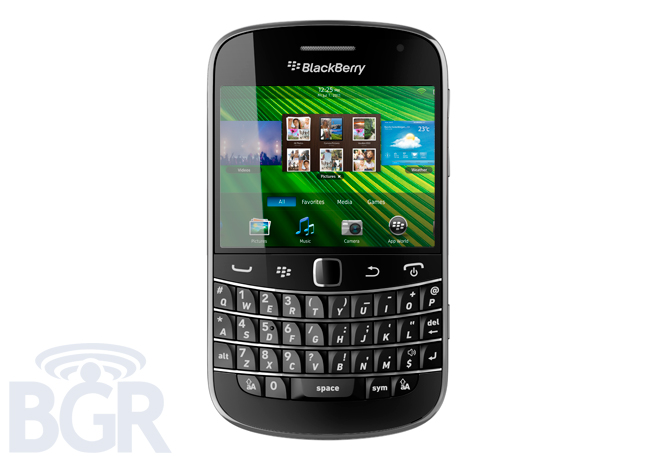
    If this report from BGR proves to be more than just a rumor, then we might be seeing a QNX-based smartphone rolling out of RIM's oven early next year. Codenamed BlackBerry Colt, it could be a first among BlackBerry devices. Certainly something that BlackBerry fans may want to look at.
    First things first. The BlackBerry Colt (kinda has a ring to it, no?), as BGR notes, will be based on a QNX-platform. This means it will be more similar, software-wise to the PlayBook which runs on the QNX-based BlackBerry Tablet OS. If all goes according to plan, then it will be a first from RIM and may start a new line of mobile devices.
    It is also reported that the so-called BlackBerry superphone will be encountering a few compromises along the way, presumably to meet the early 2012 deadline. According to BGR's source, the current test unit of the Colt is running on a single-core chip which could mean it will not sport a multi-core CPU, but then again there's still some time so that may change. Also, the handset won't be supporting current BES (BlackBerry Enterprise Server) versions due to the difficulty of rewriting the needed codes for support on QNX-based devices. Still, we're told that RIM is working on QNX-specific BES versions so that's something to look forward to in terms of their future devices.
    That's it for now, no other notable tid bits were revealed especially by way of hardware. However, the BlackBerry Colt does offer us an interesting insight onto the Canadians' possible future plans. Are they planning to go all out and release mobile devices on several high-end platforms (hello,Nokia) or are they planning to go solo with QNX? We're betting on the former since they've justreleased a few goodies running BB OS7. But then again, you never know.


    Credits to: BGR

    Monday, August 1, 2011

    Facebook for BlackBerry Works Over Wi-Fi


    Well I download it and I thought it works with GLOBE but unfortunately it doesn't, good thing our GLOBE 3G wi-fi Internet connections saves it.  The last time I download Facebook App for Blackberry in Blackberry App Store  it requires me to have BIS (whatever) from GLOBE, but well what do you expect from me, a student only with no job. hahaha. I can't support it to be honestly.


    Then, One good night comes I just found out that I can do Facebook FREE but for a limited time (90 Days) to be exact,  I tried without wi-fi but it doesn't works then i turn on the wifi and booom it f***n works. Yeah I know im too exaggerate! well It's my very first time to use it then why not enjoy.. haha 


     Very fast access from News Feed to Photos!


    Fast, reliable and real-time chat at it's BEST!! Haha


    So what you're waiting for DOWNLOAD it now!

    If you do have wi-fi at home or works this will surely help you!


    TTT

    Related Posts Plugin for WordPress, Blogger...